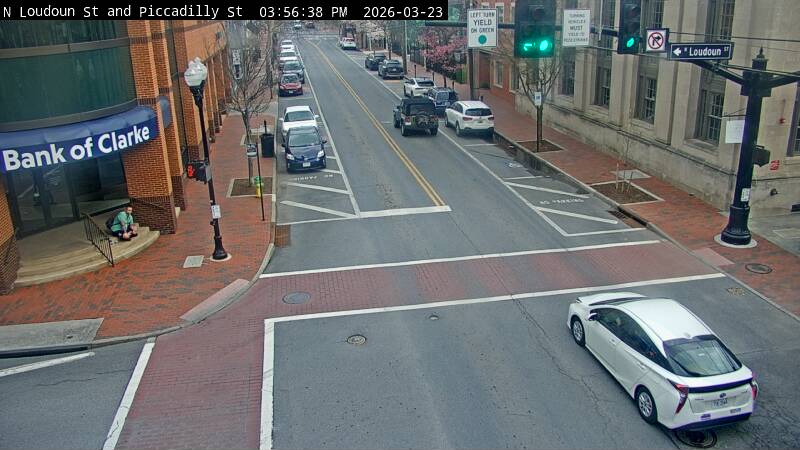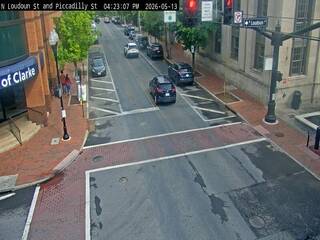
Homely I really do feel bad for calling you wrong when I was but now I feel uncertain about the cams I've identified, I think I may be using google lens more in oreder to get a consensus on a location.
Homely03/24/26 15:30
Welp, bless you for your candor, N Q! I saw your comments last night but only had my cell phone, on which I cannot log in or comment. I knew it was Winchester because my grandparents lived not far from there when I was growing up, and I confirmed my hunch by checking those cross streets. Sorry that your method was undermined by this discovery, though!
N Q03/24/26 13:54
Homely I owe you a big apology, you were correct and all of my ip# locators were wrong. I google the crossroads N. Loudoun St & Piccadilly St and Winchester, VA was the only city that has those crossroads.
Now I have to wonder about the other locations I added because the one ip locator that accurately shows my location is one of them that showed this as Atlanta Georgia and the other two locators I've been using here are two that are only off on my location by 5 miles, but they also showed this as Atlanta. All of the others are way off on my location by both miles and states and none of the ip locators came up with Winchester, VA
I've been using the 3 ip locators here, that are the ones that show this as Atlanta because of their accuracy with my ip location.
N Q03/24/26 04:25
I decided to do some more checking on the location for this cam and 3 of my ip locators are stating it's Alanta Georgia but I also tried 2 of my other locators and I googled it and I came up with Midlothian Virginia, Huntington W Virginia & Charlottesville Virginia, so now I'm not sure where the location is. Tomorrow I'll check out the cross streets to see which city has those streets.
I've had ip locators being off by about 30 miles or so, but I've never had them off by that many states. The ip locator that I mainly use in here, is the only one that has the right location for my ip#
N Q03/23/26 22:06
Oops, I forgot to say that before right clicking on a webcam to get it's ip#, the webcam has to be set to Live View or Refreshing Still Pictures.
N Q03/23/26 21:50
I should take the time to explain that until the country/state/city are found, which are found by their ip#, the coordinates are incorrect, so you can't go by those.
The ip# for each can can be found by first opening up the can, then right clicking on the webcam and choosing the "open in another tab option", at that point you will see the ip# in it's address. This is what I see for an address when I did that for this webcam-
http://96.75.209.50/mjpg/video.mjpg
You see the first 4 sets of numbers, that's the ip# for this cam, 96.75.209.50. The 4 sets of numbers will always have 1-3 numbers in each set. I then take the ip# to https://www.ip2location.com/demo
and I paste it into Lookup box, but when I copy the number, the copying function normally adds on the http:// and the / after the ip#, those addons have to be deleted before you click the Lookup button. After clicking, you'll find all of the webcam info below it.
N Q03/23/26 21:33
Nope you got it wrong, this is Alanta Georgia according to it's ip#
Homely03/23/26 21:11
Hope I got the lat and long correct.
To view more comments and suggest corrections for the camera information, please log in.
Comments (8)
To view more comments and suggest corrections for the camera information, please log in.